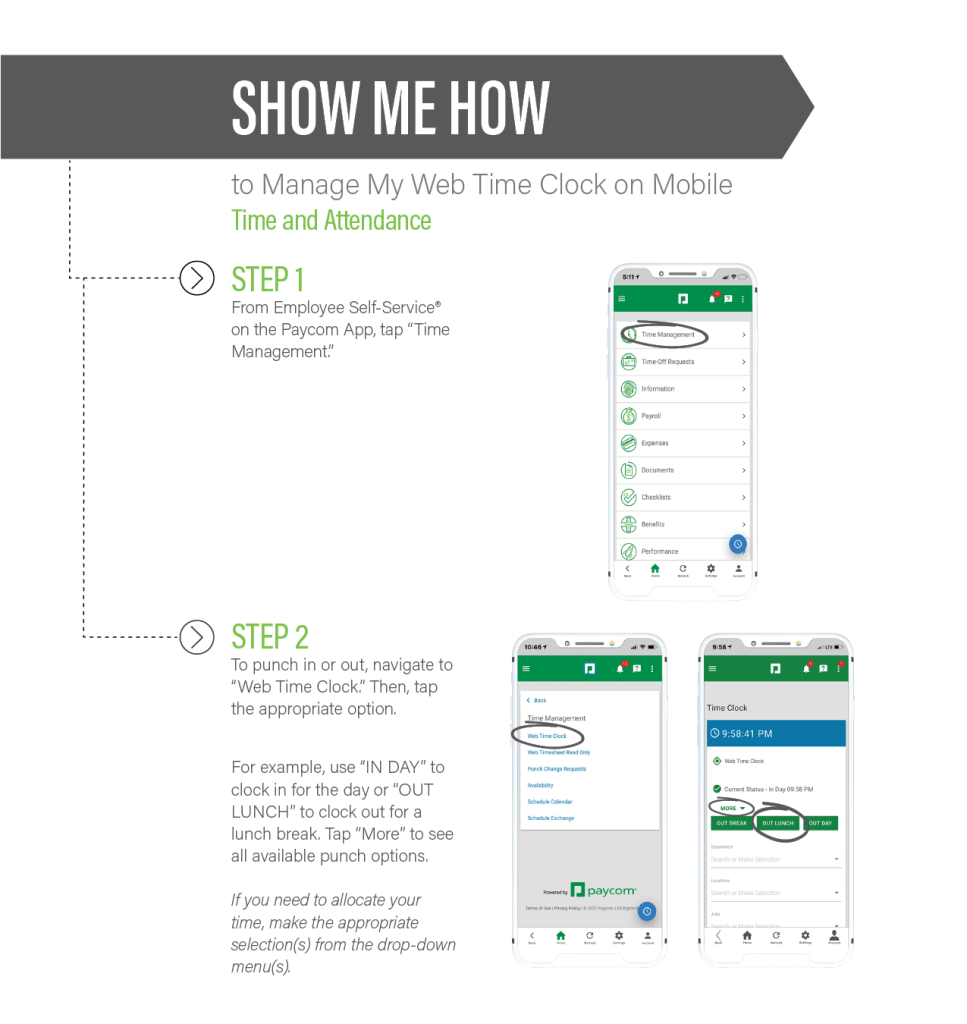
If you have any questions about how to use Paycom, take a look at the all of our ‘How-to’ tutorials in the Paycom section of the Driver’s Portal tab on the STYX Logistics homepage: www.styxlogistics.com
We have easy to understand tutorials for all of the following topics:
- How to Use Quick Punch
- How to Approve Your Timecard
- How to Review Your Schedule
- How to Manage the Web Time Clock
- How to Set Your Availability
- How to Request a Punch Change
- How to Manage your Time with Web Time Sheet

Stay on top of things – get your pay and get your hours!
Avoid any last minute hassles with your pay and your schedule. Check your Styx email for notifications from Paycom to fix any issues with your hours, your schedule, your pay, etc. Use the tutorials above to fix and master all the Paycom processes!
Take a moment to review our new Paycom ‘How-to’ Portal – you may learn something new or find an easier solution to managing your weekly schedule and pay. Also, remember that you can always access Paycom from your personal computer if your cell just isn’t cutting it. Just type in the web address: www.Paycom.com and then enter your Username and Password. From there you can fix any pending tasks you may have.